Pythonで日数差を計算した際、整数型ではなくtimedelta型で結果が出力されました。このままでは整数型との計算ができませんので、timedelta型を整数型に変換する方法を調べました。また、timedelta型から変換せずに計算する方法も載せています。
なおこれがベストな方法とは限りませんので、ご了承ください。
<実行環境>
Python3 (3.7.4)
Jupyter Lab version 1.1.4
Windows 10 (64bit)
ライブラリのインポート
必要なライブラリを以下の通りインポートします。
今回はCSVファイルの取り込みデータを想定し、データフレームに文字列型で作成された日付を取り扱います。
import pandas as pd
from pandas import DataFrame, Series
import datetime
from datetime import timedelta
日付(文字列型)をデータフレームとして作成
df = pd.DataFrame({ 'DateA' : ['2020-01-15','2020-01-15','2020-01-15'],
'DateB' : ['2020-01-15','2020-01-01','2020-01-31']})
df.head()
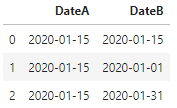
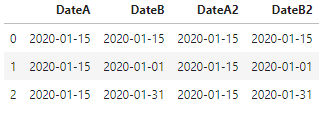
計算可能とするため、日付を文字列型からdatetime型に変換。
df["DateA2"]=pd.to_datetime(df["DateA"])
df["DateB2"]=pd.to_datetime(df["DateB"])
df.head()
df.dtypes

日数差の計算
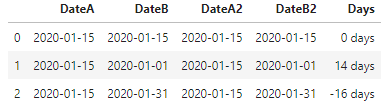
単純にdatetimeの変数同士を引き算すると、結果はtimedelta型になります。
df["Days"]=df["DateA2"]-df["DateB2"]
df.head()
df.dtypes

timedelta型はinteger型の数値との単純計算はできません。
df["Days2"] = df["Days"] + 1

timedelta型を整数型に変換
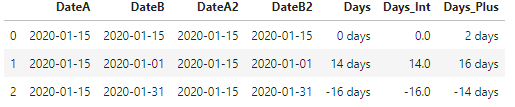
以下のように timedelta(days=1)で割ることで、整数型に変換することができました。
df["Days_Int"] = (df["Days"] / timedelta(days=1))
timedelta型のまま計算を行う
以下のように timedelta(days=1) を加減算することで、timedelta型のままでも計算ができます。
IntVar = 2
df["Days_Plus1"] = df["Days"] + timedelta(days=1) * IntVar
df.head()
以上です。